Valid proposals: how to move a match date without losing count
If you postpone a league match, it's on your team to propose new dates. Here's, step by step, what a valid proposal is, when it counts and how to answer one in the chat.
Moving a league match happens: an injury, a trip, a shift that changes at the last minute. What can’t happen is a match that never gets a date. That’s what valid proposals are for.
The idea in four steps
- A team postpones the match. From that moment, the match has no date.
- The team that postponed proposes new dates in the match chat. A proposal is valid when it follows the competition’s rules, for example, that the date falls in the following week.
- The other team answers: they accept a date or say they can’t make it.
- If the team that postponed reaches the number of valid proposals their league asks for, the postponement is no longer on them: they’ve done their part, and the organization reviews it and confirms it.
In short: whoever postpones has to show they’re trying to play, and valid proposals are how they show it. It all happens in the match chat.
Step 1: postponing the match
Proposals are made by the team that postpones. Before you confirm, Reservo tells you in the same dialog:
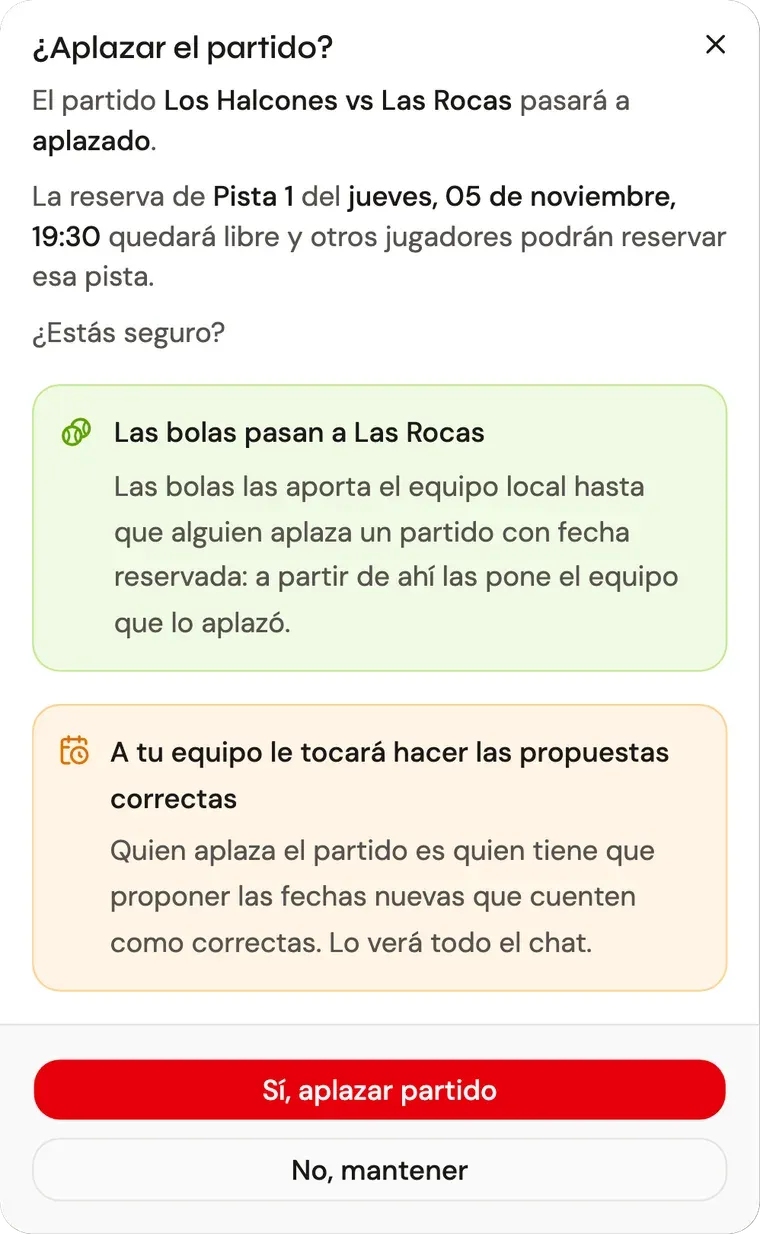
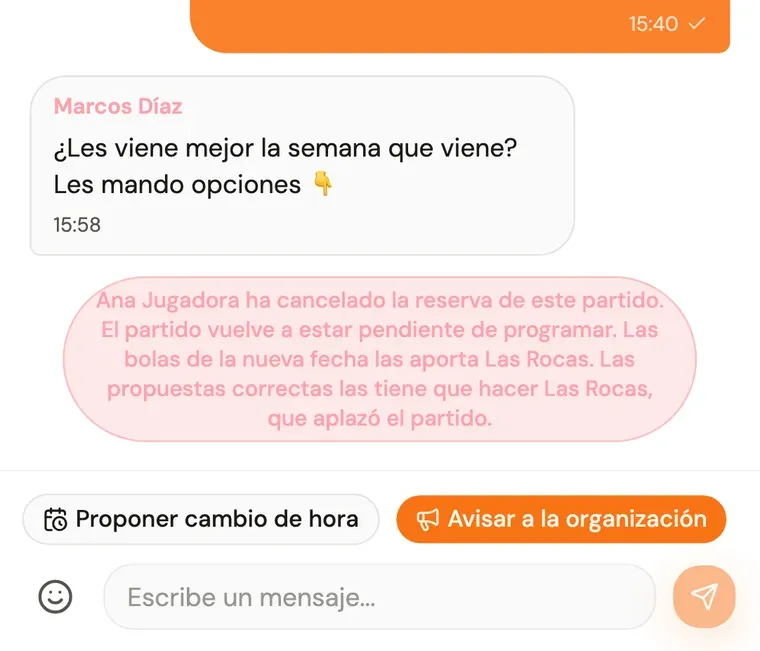
When you postpone, the chat tells both teams who cancelled the booking and whose turn it is to propose:
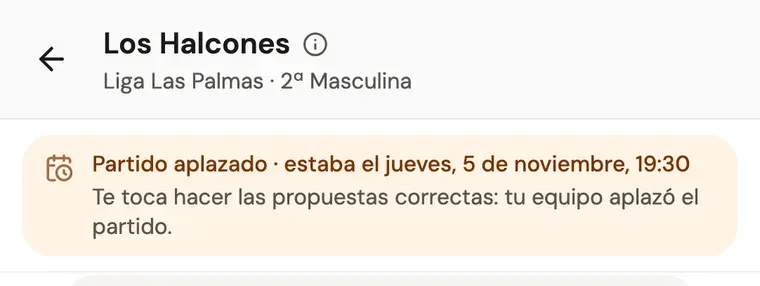
While the match stays postponed, a notice stays pinned at the top of the chat with the date it had and whose turn it is. If it’s your team, it’s highlighted:
Mind the court. When you postpone, the court is released right away and anyone can book it. If you want that same slot back, propose it in the chat like any other date: while it’s still free, it can be accepted.
What if you only want to change the time, without postponing? That’s done in the chat too, but it’s different: the match keeps its court until both teams accept the new date, and if you don’t agree, it’s played when it was. Since nobody postponed, those proposals don’t count as valid and have no clock.
Step 2: proposing dates
Tap Propose new time in the chat. You can see every free time or only the ones that would count as a valid proposal, which is the quickest option if it’s your turn.
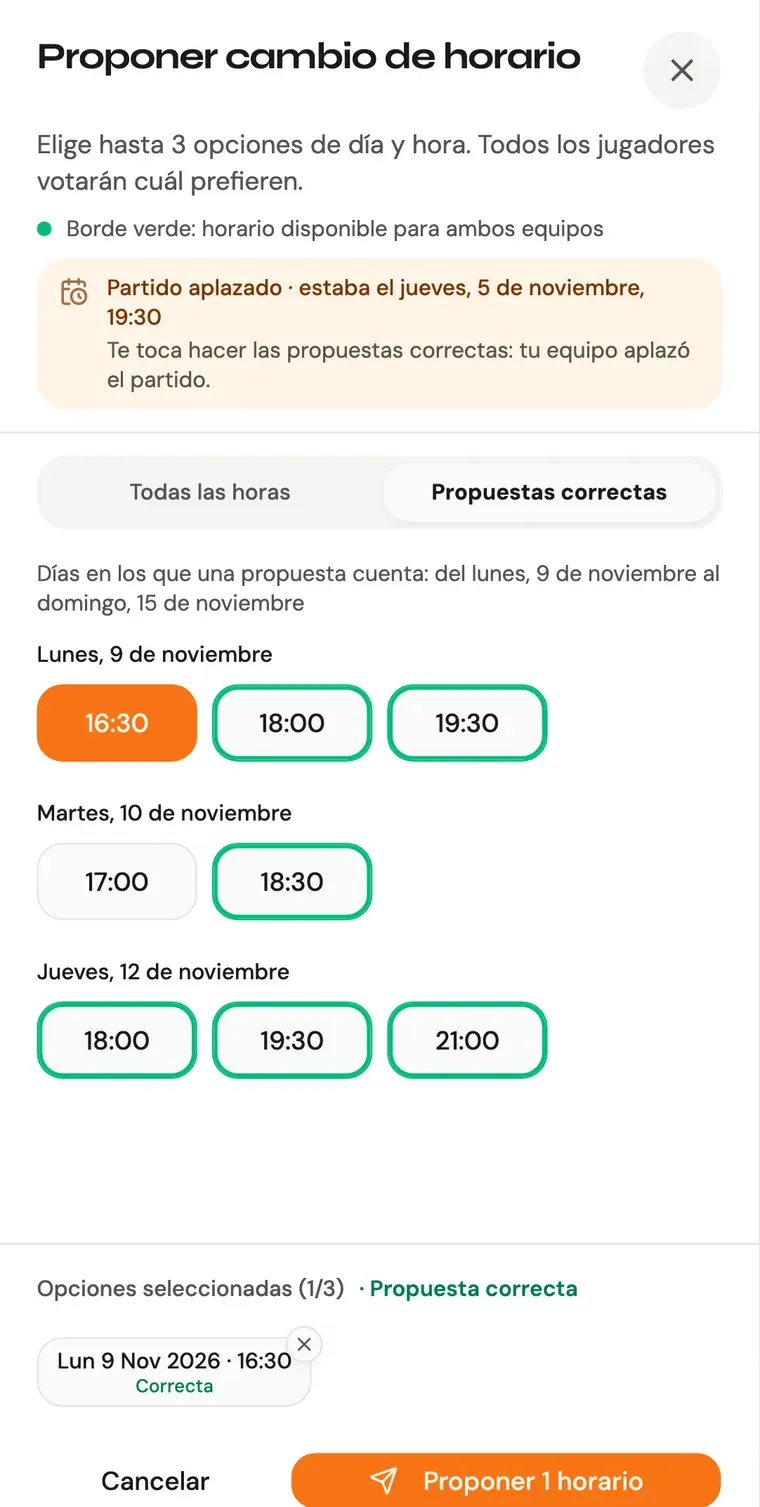
- Only the days your competition’s rule allows are shown, and on them, the times that would count.
- Times with a green border suit both teams according to the schedule they’ve declared. They’re the ones most likely to be accepted.
- At the bottom you see the dates you’ve picked and whether the proposal will be valid.
You can propose several dates at once. One valid date is enough for the whole proposal to be valid.
What if no time shows up? It can happen that, on the days the rule allows, there’s no free time that counts. Then your team can’t comply however much it wants to, and the organization needs to know. That’s what the Alert the organization button is for:
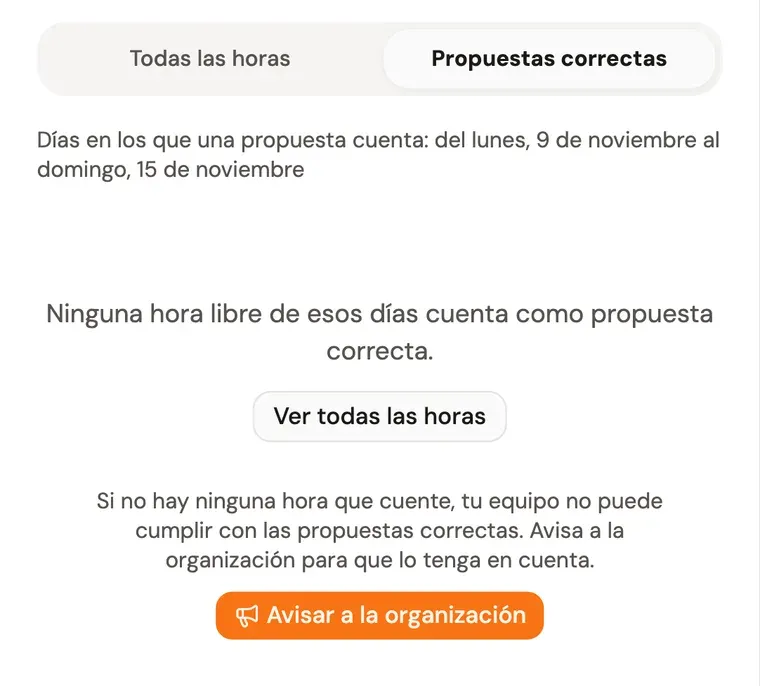
With one tap, the organization gets the alert with the dates that had no options, and the chat shows that they’ve been alerted.
Step 3: what a proposal looks like
Each proposal shows up in the chat as a card like this:
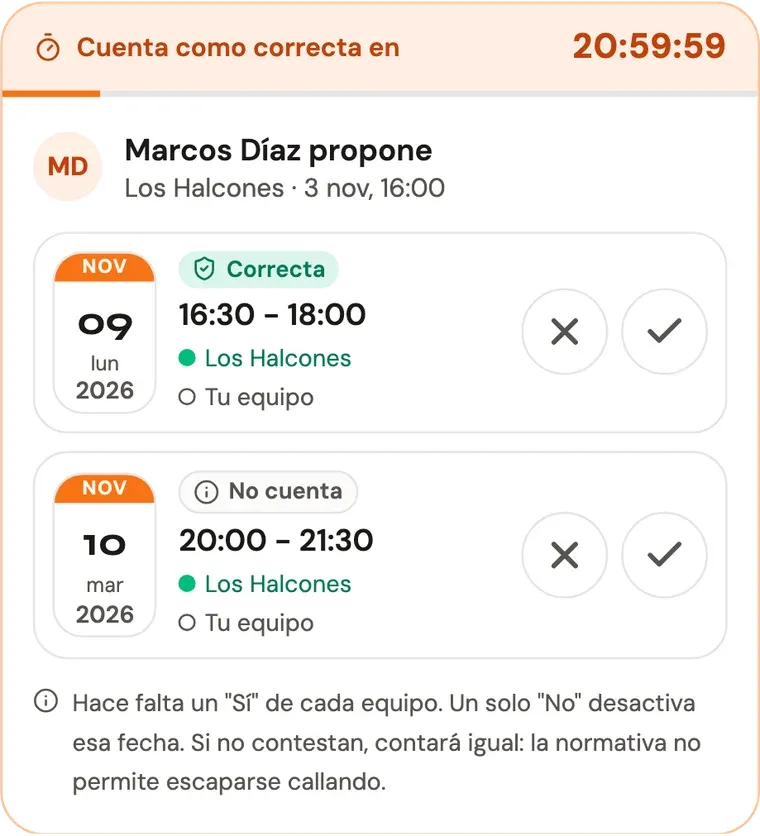
From top to bottom:
- The clock: how long until the proposal counts as valid even if the other team doesn’t reply.
- Who is proposing, which team and when.
- Each date, with a label: Valid if it follows the rules, Doesn’t count if it doesn’t.
- What each team voted: a green dot is a yes, a red dot is a no and an empty dot means they haven’t voted yet. Whoever proposes has already said yes to their dates.
Step 4: when a valid proposal counts
A valid proposal starts counting as soon as one of these two things happens:
- the other team answers, by voting on any date or making its own proposal;
- or the clock runs out without a reply. Staying quiet is not a way out.
With less than an hour left, the clock turns red:
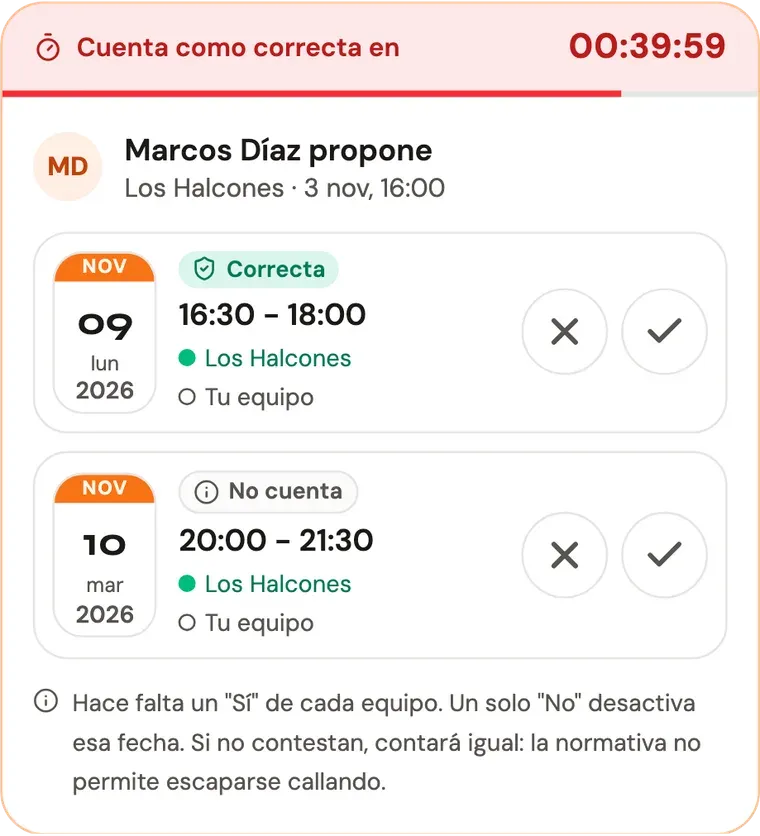
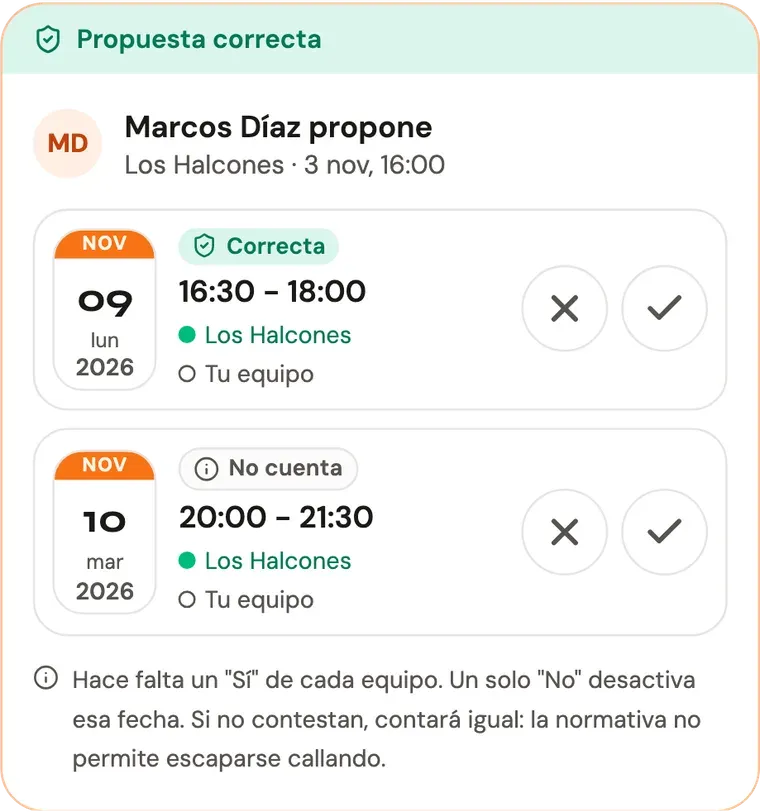
Once the proposal counts, the strip at the top turns green. You can still vote as usual:
What if whoever proposed changes their mind? They can withdraw the proposal. If they withdraw it before it counts, it doesn’t count. If it already counted, they keep it.
If you don’t reply, it can count too
In some competitions, the organization turns on one more rule: the team receiving a proposal has to answer it, even if it isn’t valid. They have a deadline, usually 24 hours. If it runs out without anyone on their team voting or proposing something else, the proposal counts as valid. Leaving a proposal unanswered is bad manners, and here it isn’t free.
This is how it looks on the card: the dates say Doesn’t count, but the clock is running at the top:
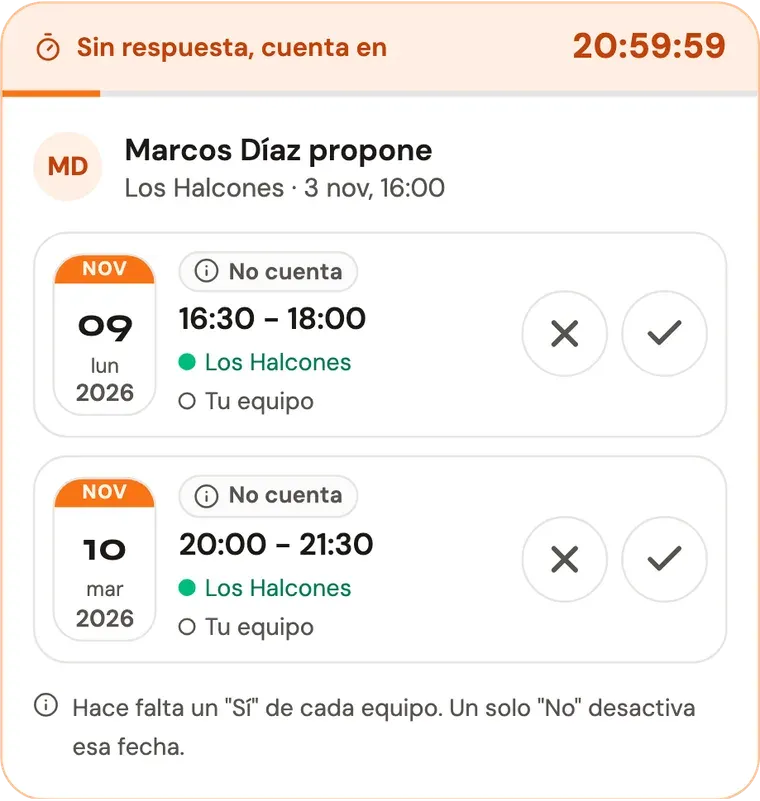
- If you reply in time, with a ✓, a ✕ or your own proposal, it still doesn’t count.
- If you don’t, when the deadline passes the strip turns green: “Valid: the rival didn’t answer in time”.
- If whoever made it withdraws it or replaces it before the deadline, it doesn’t count.
So it doesn’t slip through, the captain of the team receiving the proposal gets an email with the dates and the exact time the deadline ends. If you’d rather not get it, you can turn it off in your profile, under Date proposals awaiting your answer.
How to answer a proposal
Each date has two buttons: ✓ if it works for you and ✕ if you can’t make it.
Saying no turns that date off, but it isn’t final: if whoever said no changes their vote, the date is available again.
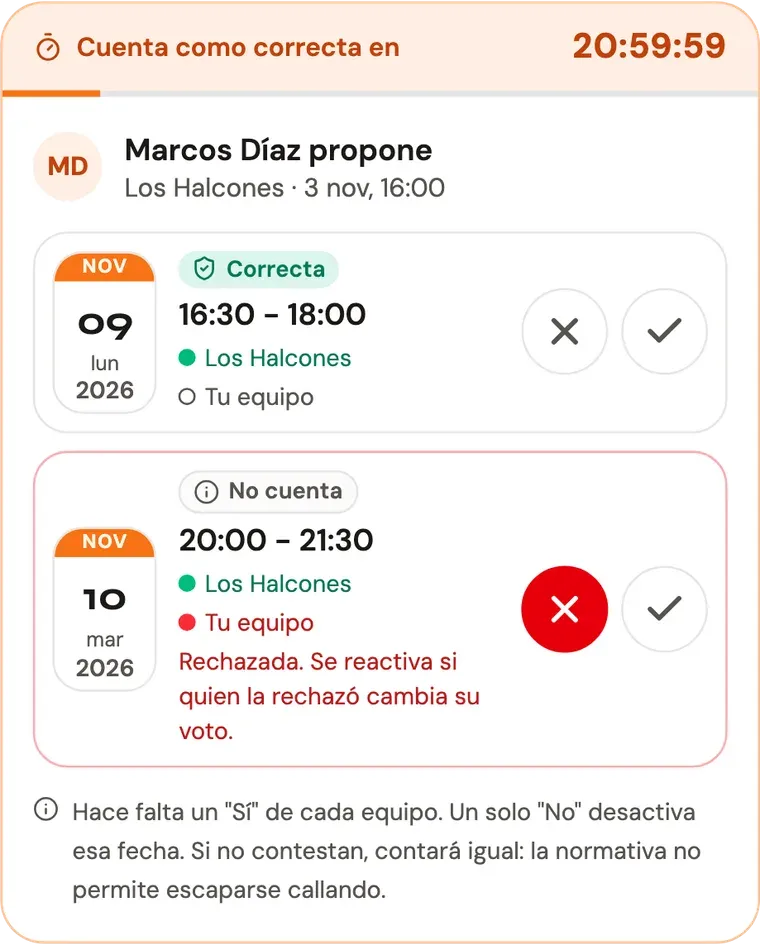
Only the team receiving the proposal can say no. Whoever proposes only sees the ✓ on their dates. If what they proposed no longer works for them, they should withdraw the proposal.
When both teams say yes to the same date, the match moves right then. That’s why the yes that closes the deal asks you to confirm and shows you what will happen: the new date with its court and the one being cancelled.
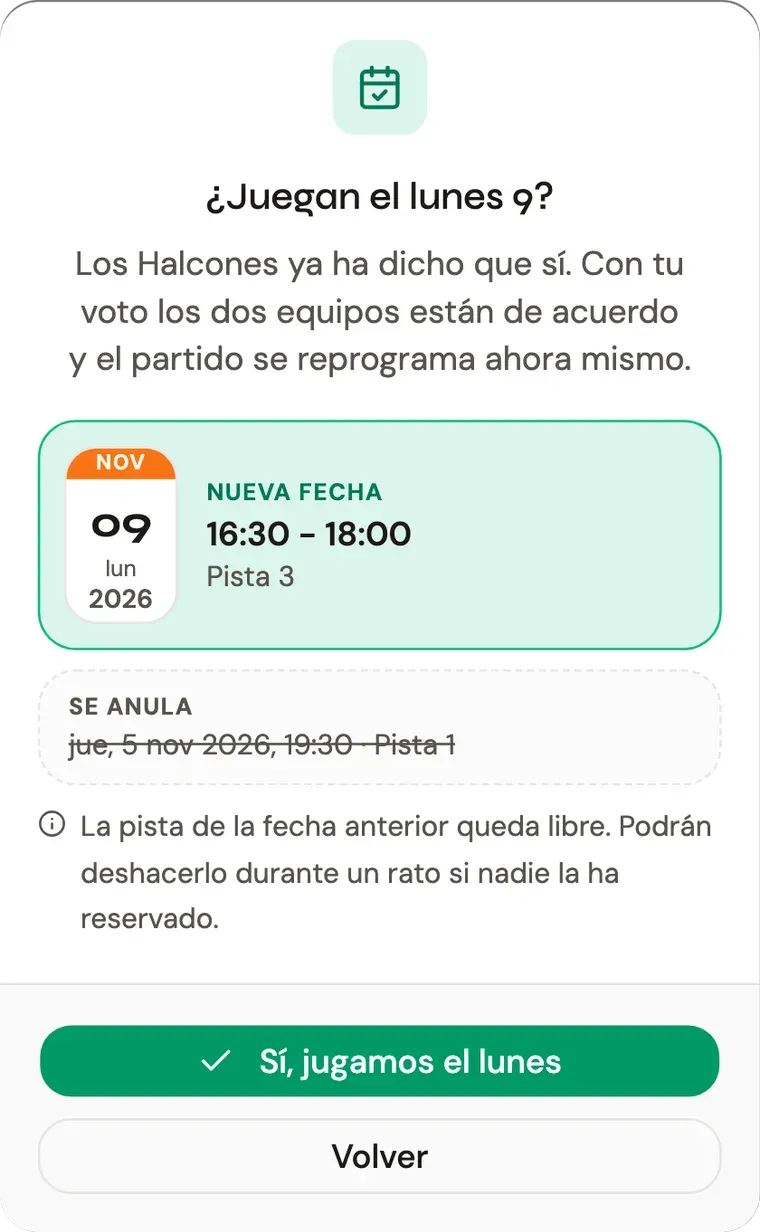
Once confirmed, the match has its new date for both teams, and the card makes it clear:
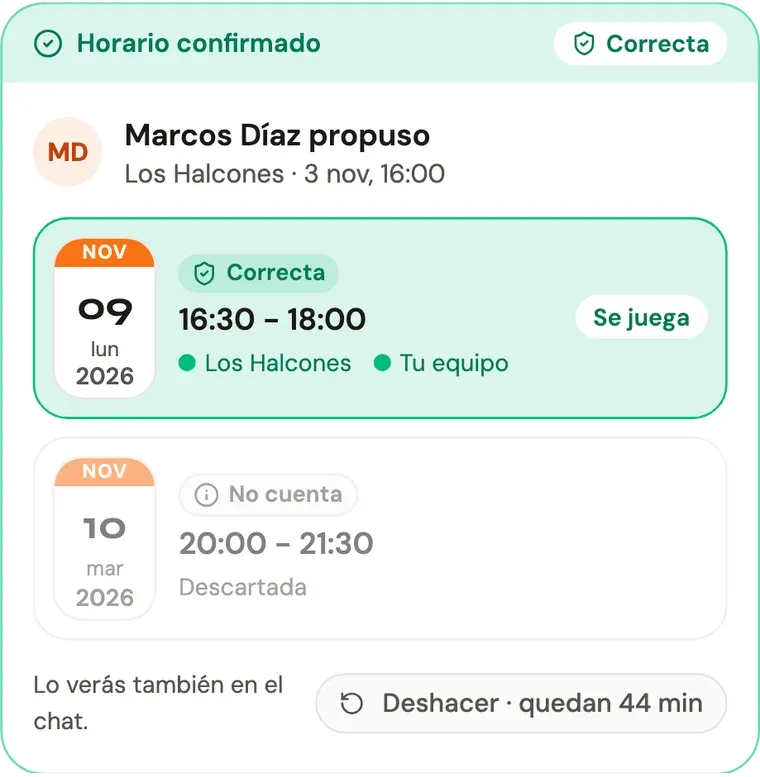
Made a mistake? For one hour you can undo the change from the card itself, and the match goes back to how it was:
- If it was postponed, it’s postponed again, with no date.
- If it was a time change, it gets its previous date and court back, as long as nobody has booked it in the meantime. If it’s no longer free, the match is left without a date.
If the other team undoes it, the proposal still counts for whoever made it. If the team that proposed undoes it, it stops counting.
In short
- Whoever postpones, proposes. You’ll see it when postponing, in the chat and in the notice pinned at the top.
- Postponing gives up the court. A time change without postponing, on the other hand, keeps it until the new date is accepted.
- A proposal is valid if at least one of its dates follows the rules, and it counts when the other team answers or when the clock runs out.
- If no time counts, alert the organization from the proposal panel.
- Only the team receiving the proposal can say no. Whoever proposed, if they change their mind, withdraws it.
- If your league has it turned on, not replying in time has consequences: the proposal counts as valid even if it doesn’t follow the rules, and the captain gets an email with the deadline.
The exact rules are set by each competition: how many valid proposals you need, how far ahead you have to propose or how long the clock runs. You’ll find them in the welcome message of every match chat.